pacman::p_load(jsonlite, tidyverse, SmartEDA, tidygraph, ggraph)In-class Exercise 5 Mini Challenge 1
In-class Exercise
Getting Started
In the code chunk below, p_load() of pacman package is used to load the R packages into R environment.
Importing Knowledge Graph Data
In the code chunk below, fromJSON() of jsonlite package is used to import MC1_graph.json file into R and save the output object.
kg <- fromJSON("data/MC1_graph.json")Inspect structure
str(kg, max.level = 1)List of 5
$ directed : logi TRUE
$ multigraph: logi TRUE
$ graph :List of 2
$ nodes :'data.frame': 17412 obs. of 10 variables:
$ links :'data.frame': 37857 obs. of 4 variables:Extract and inspect
nodes_tbl <- as_tibble(kg$nodes)
edges_tbl <- as_tibble(kg$links)
Initial EDA
ggplot(data = edges_tbl,
       aes(y = `Edge Type`)) +
  geom_bar()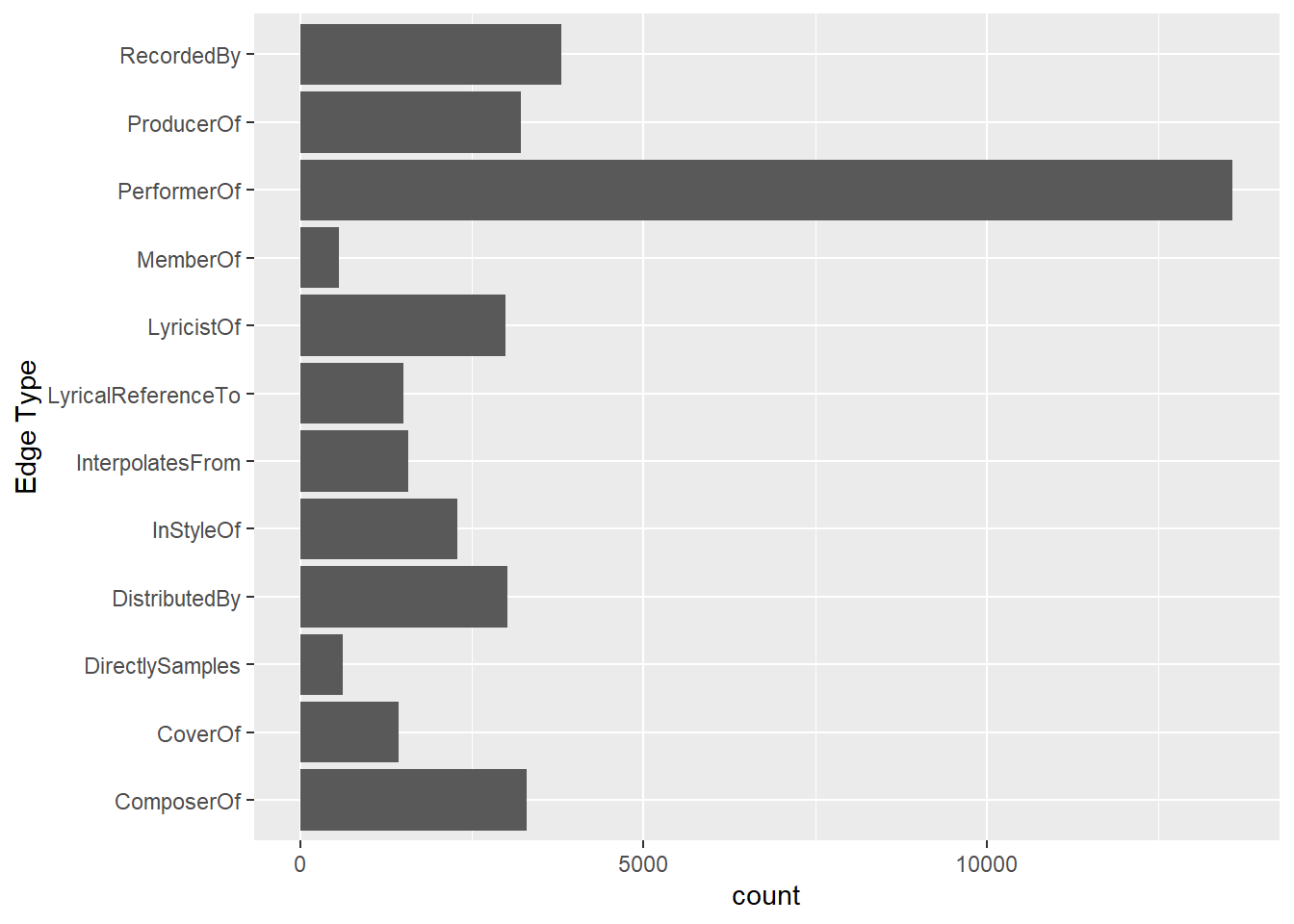
ggplot(data = nodes_tbl,
       aes(y = `Node Type`)) +
  geom_bar()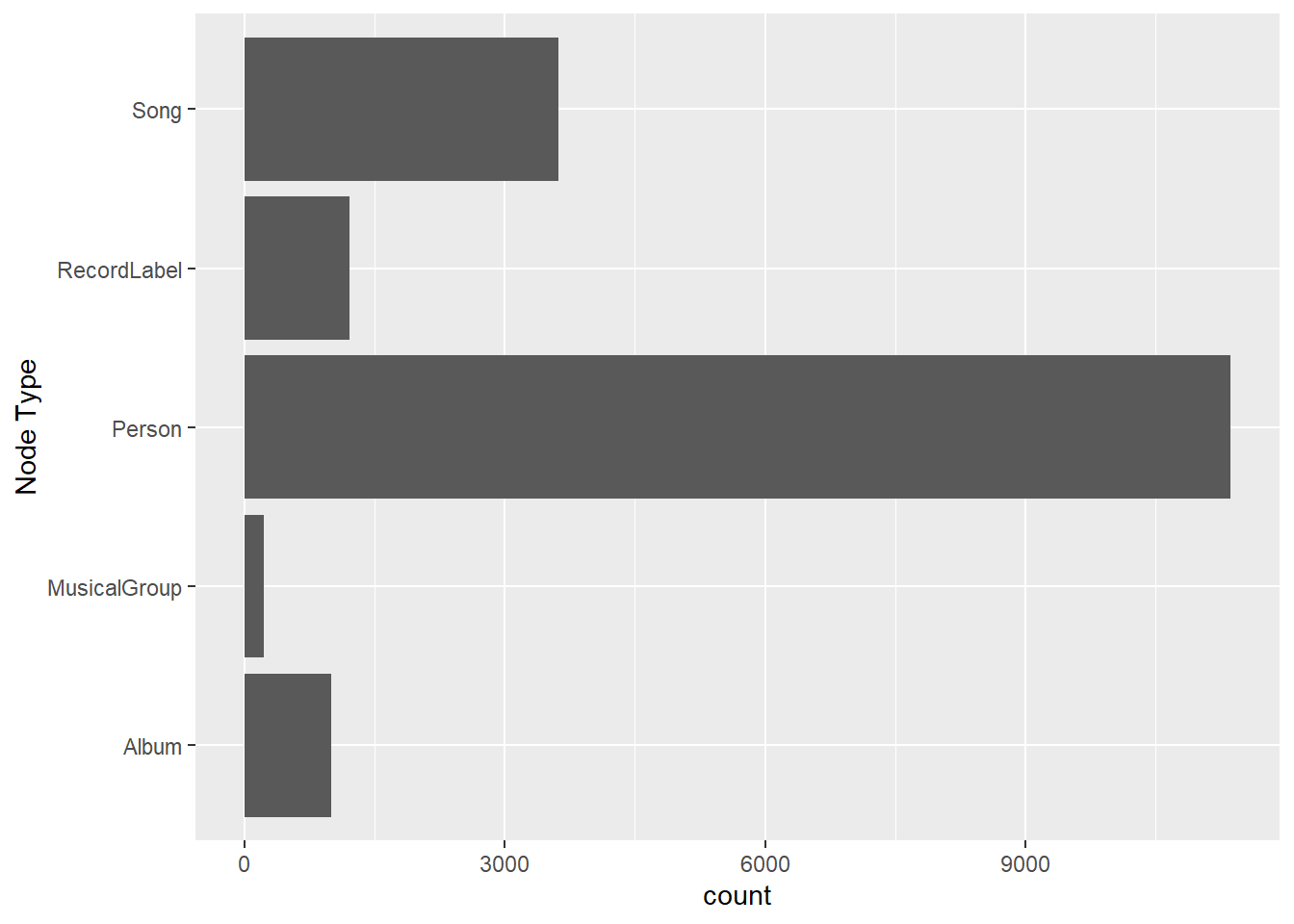
Creating Knowledge Graph
Step 1: Mapping node id to row index
id_map <- tibble(id = nodes_tbl$id,
                 index = seq_len(
                   nrow(nodes_tbl)))
This ensures each id from node list is mapped to the correct number.
Step 2: Map source and target IDs to row indices
edges_tbl <- edges_tbl %>%
  left_join(id_map, by = c("source" = "id")) %>%
  rename(from = index) %>%
  left_join(id_map, by = c("target" = "id")) %>%
  rename(to = index)
The number of observations in edges_tbl should be the same as before running this code chunk.
Before doing leftjoin, there are only 4 variables. AFter doing the leftjoin, there is two additional variables.
Step 3: Filter out any unmatched
edges_tbl <- edges_tbl %>%
  filter(!is.na(from),!is.na(to))
This will get rid of any missing values.
Step 4: Creating the graph
Lastly, tbl_graph() is used to create tidygraph’s graph object by using the code chunk below.
graph <- tbl_graph(nodes = nodes_tbl,
                   edges = edges_tbl,
                   directed = kg$directed)
Directed will be plugged from kg table’s directed column.
Visualising the knowledge graph
set.seed(1234)This is to ensure reproducibility. ### Visualising the Whole Graph
ggraph(graph, layout = "fr") +
  geom_edge_link(alpha = 0.3,               # line, alpha is transparency
                 colour = "gray") +
  geom_node_point(aes(color = `Node Type`), # point (plot after line so that it doesn't get covered by line)
                  size = 4) +               # size of point
  geom_node_text(aes(label = name),         # label using name
                 repel = TRUE,              # prevent overlapping names, force words apart
                 size = 2.5) +
  theme_void()
Visualising the sub-graph
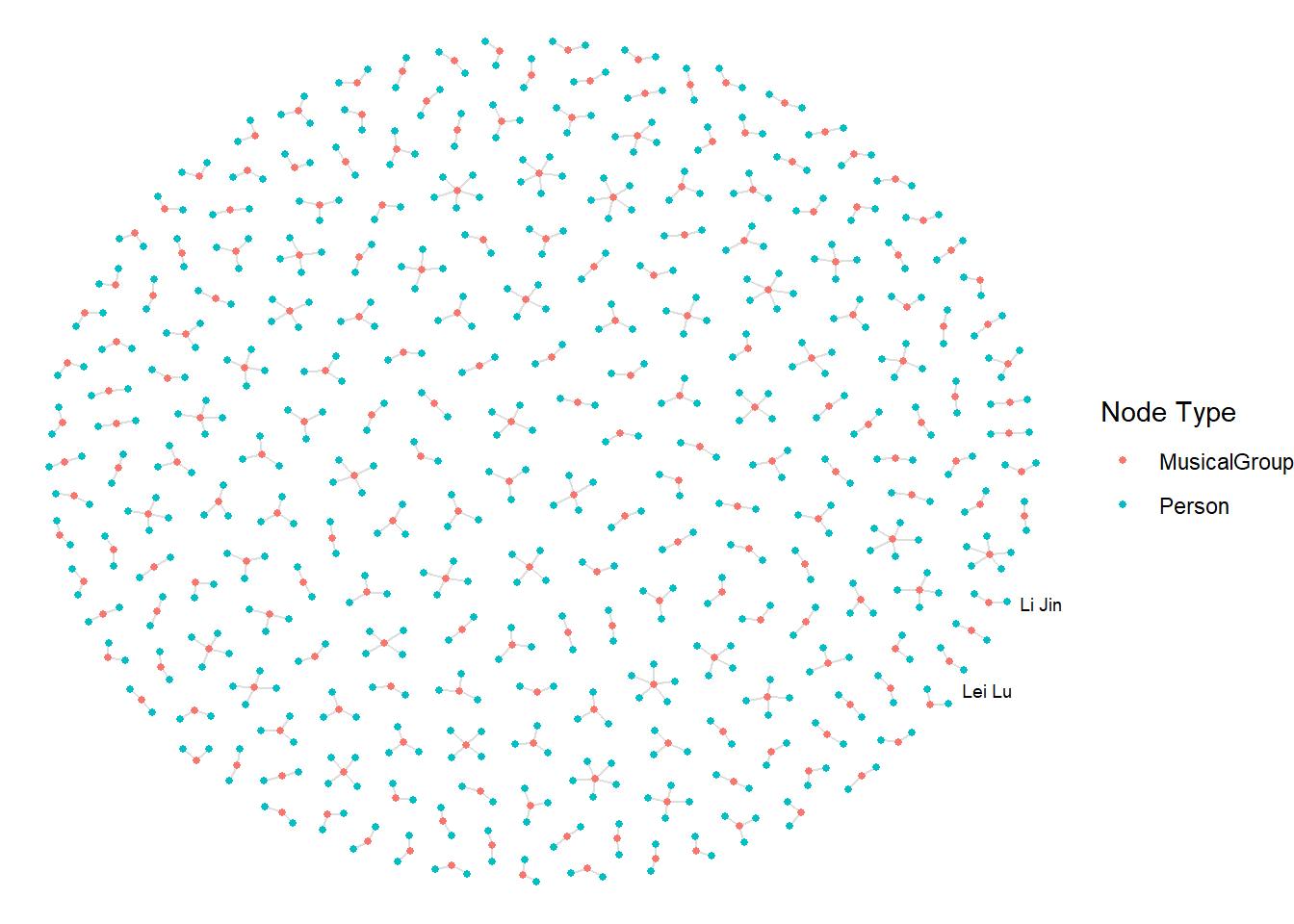
In this section, we are interested to create a sub-graph base on MemberOf vaue in Edge Type column of the edges data frame.
Step 1: Filter edges to only “MemberOf”
graph_memberof <- graph %>%
  activate(edges) %>%                     # Focus on edges table
  filter(`Edge Type` == "MemberOf")       # Filter to Memberof
Step 2: Extract only connected nodes (i.e., used in these edges)
used_nodes_indices <- graph_memberof %>%
  activate(edges) %>%
  as_tibble() %>%
  select(from,to) %>%            # Only selected variables
  unlist() %>%                  # beCause it is a graph model, not a list
  unique()
This is to eliminate orphan nodes.
Step 3: Keep only those nodes
graph_memberof <- graph_memberof %>%
  activate(nodes) %>%
  mutate(row_id = row_number()) %>%
  filter(row_id %in% used_nodes_indices) %>%
  select(-row_id)  # optional clean up
Plot the sub-graph
ggraph(graph_memberof,
       layout = "fr") +
  geom_edge_link(alpha = 0.5,
                 colour = "gray") +
  geom_node_point(aes(color = `Node Type`),
                  size = 1) +
  geom_node_text(aes(label = name),
                 repel = TRUE,
                 size = 2.5) +
  theme_void()